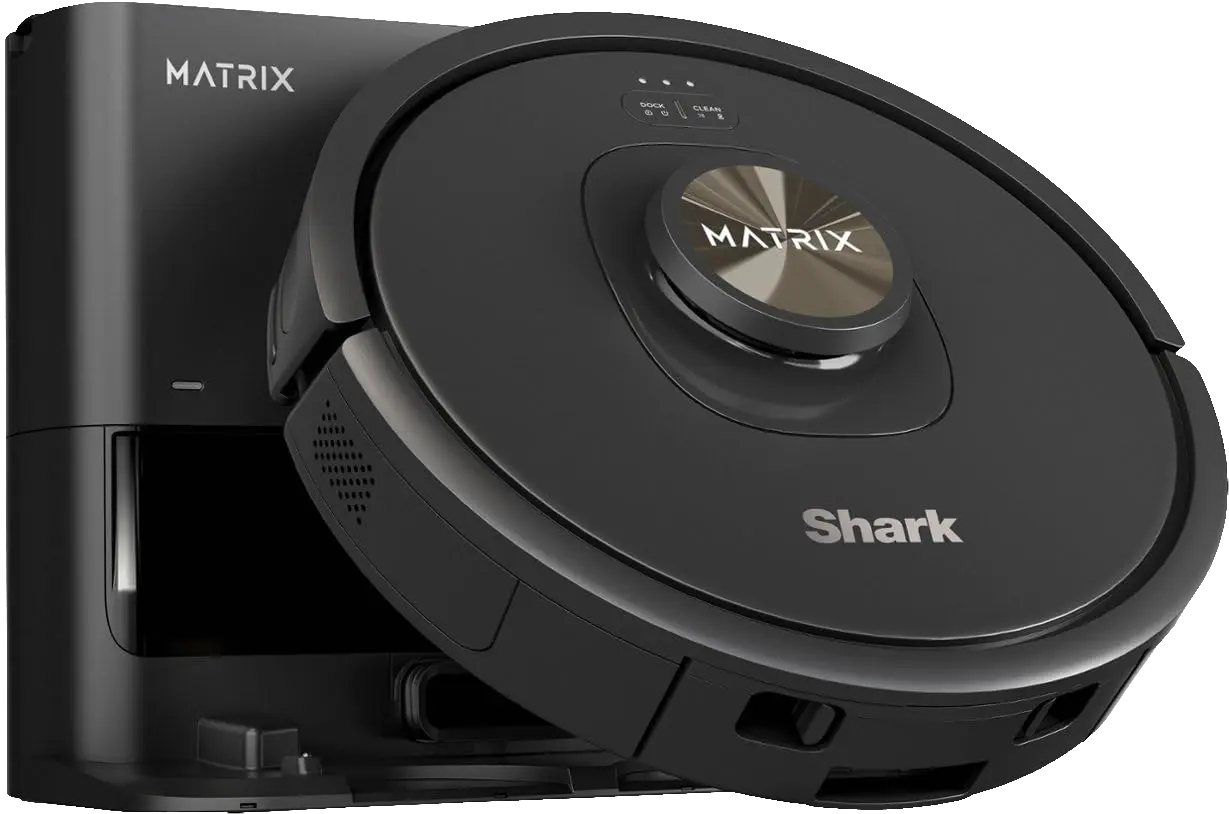
My Original Vacuum: RV2320EDUS, better known as 'Mr Cleany'
Millions of Shark vacuums are currently vulnerable to remote code execution. This critical vulnerability leaves hackable cameras with wheels inside the homes of Shark vacuum owners. The vulnerability is trivially exploited as demonstrated in the writeup below. Attempts to remediate the issue with Shark have been unsuccessful as they have downplayed the severity and questioned whether "a CVE is appropriate" for the situation (really?).
In March 2026 I found a critical vulnerability that affects all internet-connected Shark Robot Vacuums. This weakness allows anyone to remotely operate any internet-connected Shark Vacuum, and execute arbitrary code. AI was not used in the writing of this blog post, however I used Opus 4.8 occasionally during the research process for various RE tasks and for writing scripts. The models of vacuums used for research are: RV2320EDUS and AV1102ARUS. To be clear, these are not the only vulnerable models. All internet-connected Shark vacuums are vulnerable.
My Original Vacuum: RV2320EDUS, better known as 'Mr Cleany'
I started researching by taking the path of least resistance, looking for anything interesting. I employed the common techniques that are recognizable by every security researcher: open source research, port scanning, hardware teardowns. I looked for public resources that would help me with my research but ended up finding almost nothing. I started disassembling the RV2320EDUS after I noticed some exposed pins on the motherboard near the battery enclosure. I probed the pins with a multimeter, looking for logic voltage levels that might indicate UART/JTAG. Different pins showed voltage levels between .3 and 3.3 volts. I soldered wires to each pin so that I could easily attach them to my adapter. I got lucky and I found the pinout after some trial and error with a UART adapter.
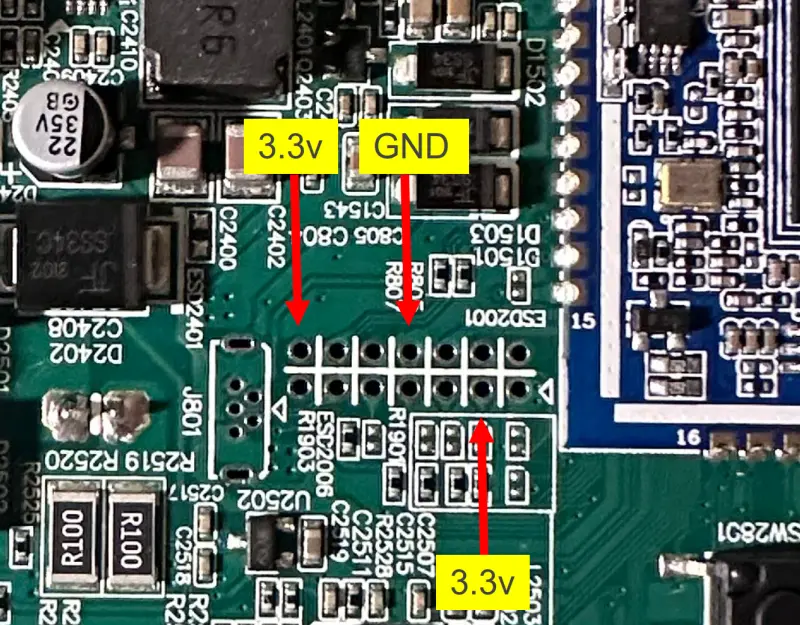
Debug Pins on Motherboard
I analyzed signals from the TX pin and found that it was indeed UART with 8n1 1500000 baud as the settings.
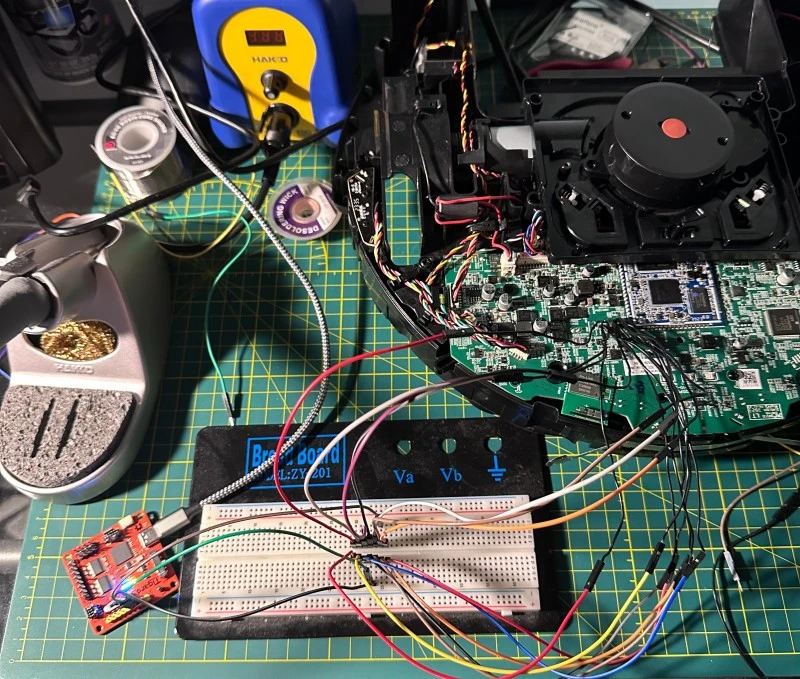
UART Setup with my Tigard
After attaching my UART adapter and booting the device, I started seeing boot logs scroll in my terminal. Once the system booted I was prompted with a login. I tried default passwords such as "root", "admin", etc. with no luck. I also tried the serial number, MAC, and other device information but nothing worked. I started looking through the boot logs and noticed that the device was using U-Boot. I tried interrupting the boot sequence by pressing Ctrl-C and this put me into the boot menu without prompting for a password. From the U-boot menu I set the bootargs to init=/bin/sh, booting, and mounting the filesystems from their respective flash partitions using the commands below:
            $ sudo screen /dev/ttyUSB0 1500000
            setenv bootargs "console=ttyS2,1500000 init=/bin/sh"
            boot
            mount -t proc proc /proc
            mount -t sysfs sys /sys
            mount -t tmpfs tmpfs /tmp
            mount -t devtmpfs devtmpfs /dev
            mount -t tmpfs tmpfs /run
            mkdir -p /dev/pts
            mount -t devpts devpts /dev/pts
            mount -t auto /dev/rkflash0p7 /mnt/sys/
            mount -t auto /dev/rkflash0p8 /mnt/res
            mount -t auto /dev/rkflash0p9 /mnt/udisk
Now I have a root shell! Unfortunately I don't have any networking as the wireless initialization has not been run yet. I got lucky not having to set this up and opted for a more permanent remote access solution.
I wanted to gain remote access to eliminate the need to tether directly to the UART interface to access my shell. I quickly found that a full OpenSSH server existed at /usr/sbin/sshd. I just needed to write a shell script that would start SSHD after the system booted. While looking at the boot logs I found that the system was trying to run startup scripts from a specific folder after boot. Specifically, I noticed boot logs failing to find startup scripts in /mnt/udisk/debug_sh_folder. The empty debug scripts folder is run via the following scripts calling into one another: /etc/init.d/S90BootAuto.sh -> /usr/local/checkBootAuto.sh -> /mnt/res/boot/BootAuto.sh, a custom boot script that handles system startup and contains this snippet:
            debugsh_path='/mnt/udisk/debug_sh_folder'
            if [ ! -d  $debugsh_path ]; then
                mkdir -p $debugsh_path
            fi
            for sh_file in $( ls $debugsh_path/*.sh )
            do
                chmod +x $sh_file;
                $sh_file &
            done
I found the folder mounted on a writable partition /mnt/udisk/debug_sh_folder/. This turned out to be a perfect candidate for easily injecting my remote access script. I wrote a script for remote access so that I could reassemble my vacuum and get it into a working state:
            $ cat /mnt/udisk/debug_sh_folder/remote-access.sh
            #!/bin/sh

            WR=/mnt/udisk/ssh

            mkdir -p $WR/etc/ssh
            mkdir -p $WR/root/.ssh

            # Generate host keys into writable dir
            [ -f $WR/etc/ssh/ssh_host_rsa_key ] || ssh-keygen -t rsa -f $WR/etc/ssh/ssh_host_rsa_key -N ''

            # Config
            cat > $WR/etc/sshd_config <<'EOF'
            Port 2222
            HostKey /mnt/udisk/ssh/etc/ssh/ssh_host_rsa_key
            PermitRootLogin yes
            PasswordAuthentication yes
            PermitEmptyPasswords yes
            AuthorizedKeysFile /mnt/udisk/ssh/root/.ssh/authorized_keys
            EOF

            echo "" >> $WR/root/.ssh/authorized_keys
            chmod 600 $WR/root/.ssh/authorized_keys

            # Start sshd
            /usr/sbin/sshd -f $WR/etc/sshd_config -p 2222 -d

            iptables -I INPUT -p tcp --dport 2222 -j ACCEPT
Note that I completely bypass the need for a root password by adding my desktop SSH key to the authorized keys file.
After rebooting the vacuum the debug script ran and I was able to SSH into a root shell on the device. Next, I reassembled the vacuum and used my SSH shell to see what services were running on the device.
The vacuum starts a couple of custom daemons on startup from the /mnt/res folder. These daemons include:
Roboeye_server: Lidar/Motor control daemonawsd: ?devd: ?appd: Device management daemon
Running netstat showed a persistent TCP connection to an AWS server. I was able to use the proc filesystem to find the process that owned this socket which happened to be appd. Connection information from netstat:
tcp 0 0 10.30.12.4:41986 a311fj9795cmaa-ats.iot.us-east-2.amazonaws.com:8883 ESTABLISHED
appd running on the vacuum:
905 root 1359m S appd -f -o /tmp -c /mnt/res/vapp
appd gained my interest because it made a TCP connection to an AWS server. I confirmed that this persistent connection was a Websocket connection that was connected to an MQTT broker by investigating logs from the binary and correlating them with symbols found through static analysis.
appd creates a Websocket connection to an AWS IoT Core MQTT broker endpoint specified in a config file on the device:
            $ cat /mnt/res/vapp/SND.conf
            {"env":"FIELD","serial_number":"<SN>","endPoint":"a311fj9795cmaa-ats.iot.us-east-2.amazonaws.com","region":"US","model":"rv2500aab"}
Mutual TLS authentication is used to gain access to the server. The device has its own certificate and private key used for authentication at:
        /mnt/res/vapp/certs/devicePrivateKey_<SN>.pem
        /mnt/res/vapp/certs/device_cert_ca_<SN>.pem
After discovering this endpoint, I began experimenting with the AWS server by authenticating to it with my device key using a Python MQTT client and observing messages. I subscribed to my device topic and saw a stream of messages when I would send commands to my vacuum through the mobile app. Out of curiosity I attempted to subscribe to a broader range of topics using the MQTT wildcard '#'. I realized there were no access controls for subscribing to topics outside of my device serial number topic... Device topics were organized as:
$aws/things/<SN>/<OTHER-TOPIC></OTHER-TOPIC>
where <SN> would be my device serial number. I was able to subscribe to the wildcard topic $aws/things/# using my device certificate allowing me to see millions of messages going to and from the server to other devices in my region.
What if I could publish a message to one of these devices? This would mean I could at the very least remotely start and stop arbitrary vacuums across the region.
Using the private key and certificate pulled from my Shark device I can subscribe to topics on any device. This led me to believe that I could publish to them as well. I verify this claim later in the writeup by purchasing a second device and using my original key to publish messages to the new device. I did not publish messages to devices that I did not own. I wrote an interactive MQTT client in Python that allowed me to authenticate to the AWS server with my device certificate and subscribe/publish to different topics.
I began looking for a message to publish that could trigger remote code execution on an arbitrary device. To find such a message I monitored my device topics for updates as I started the vacuum using my SharkClean mobile app. Here is a snippet of an update pushed from the app to the device topic:
            $aws/things/<SN>/shadow/update/documents {"previous":{"state":{"desired":{"get_status":true,"TimeZoneName":"America/New_York","Schedule":{"Sunday":[{"Name":"","Time":"00:00:00","Enabled":false,"Sched_Operating_Mode":2,
            [SNIP]
            "Exec_Command":"keyset:dqpNh0AE"
Exec_Command sounded suspicious, so I began looking through the appd binary in Ghidra.
SET_Exec_Command:
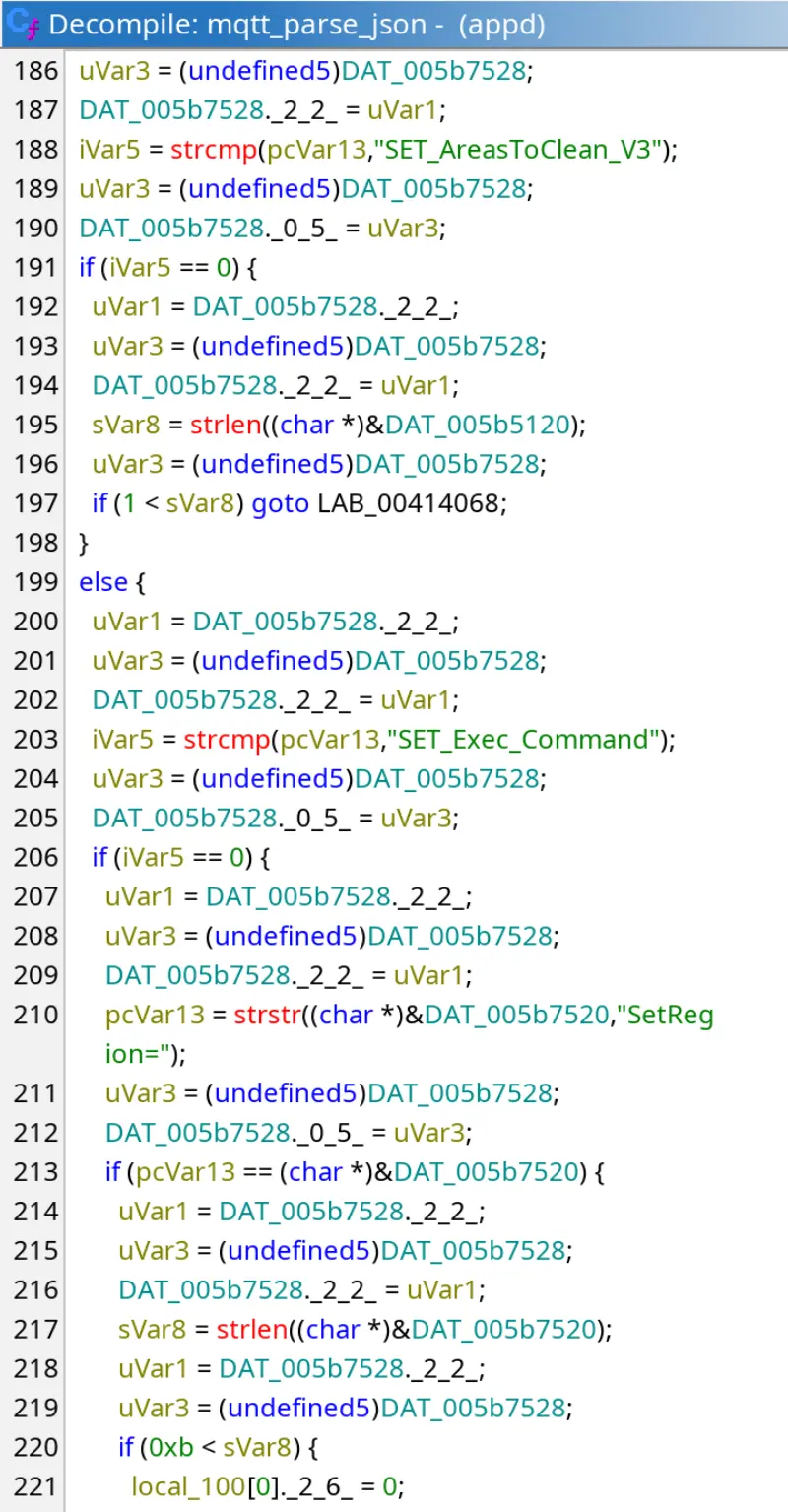
Checking for the field ex:
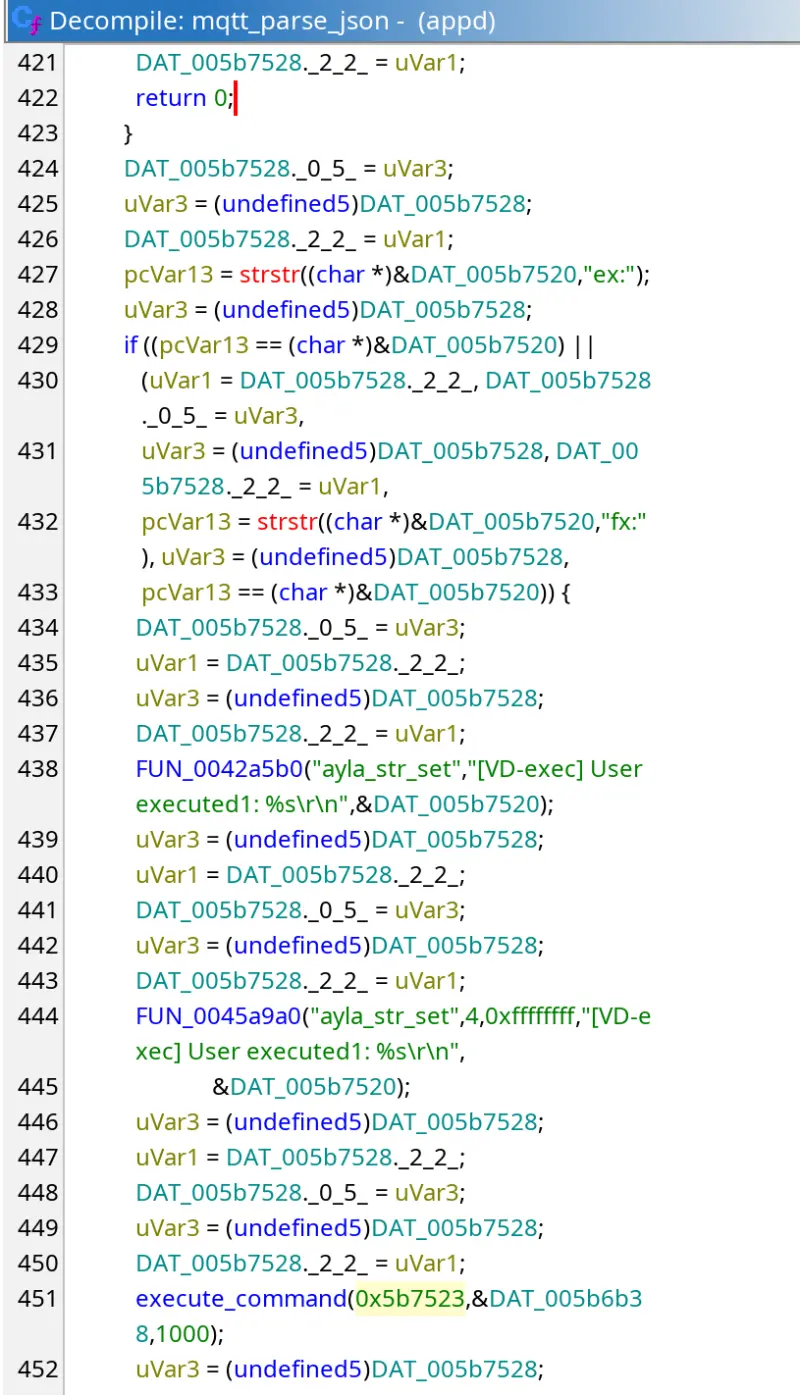
Line 427 compares the MQTT payload to the "ex:" string. Lines 429-433 check if the string was found and eventually execute_command is called on line 451. This function was named appropriately based on its definition:
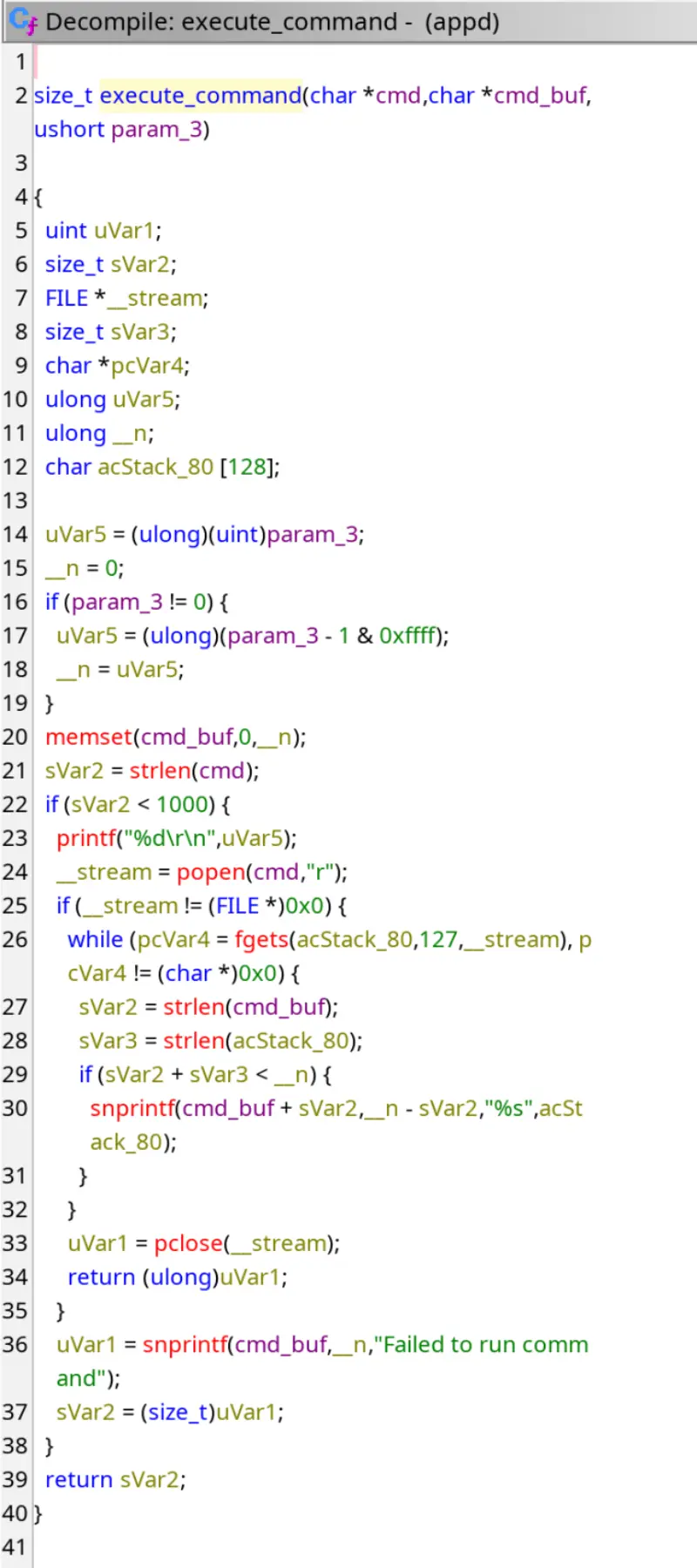
This function accepts a command as a string and executes it using popen as long as it is less than 1000 bytes. Sounds pretty self-explanatory, now it's time to test it out.
This grants an attacker over the internet complete access to an arbitrary SharkNinja IoT device using just its serial number. These serial numbers are easy to enumerate programmatically, but they can also be obtained by using the device keys to subscribe to $aws/things/#, capturing every device serial number that talks to that particular broker.
Here is how an attacker could take control of an arbitrary SharkNinja device over the Internet:
$aws/things/<VICTIM_DEVICE_SN>/shadow/update in an MQTT message structured as:
            "state": {
                "desired": {
                    "Exec_Command": "shell-command"
                }
            }
Once the victim device receives the message from the broker it will execute the shell command. It's that easy.
I modified my MQTT client debugger script to publish an MQTT message to my device topic containing an execute payload that created a file /tmp/success. After running the exploit I verified via SSH that the file was successfully created! At this point I proved that I can use my device certificate to execute arbitrary commands on my own device but I still need to prove that publishing to another vacuum is possible.
To prove this out, I bought a second vacuum of a slightly different model: AV1102ARUS. I created another script that would pull down a file over HTTP using wget and execute the file. I crafted a reverse shell payload targeting the architecture that I pulled from the first device - ARM64. I hoped that the new target device had the same architecture, and the same execute command functionality. Running the exploit...
Success! I now have proof that this vulnerability allows me to execute code on other devices using my original device certificate. It also works across models.
To the average non-technical person, the consequences of remotely executing code on their vacuum may seem insignificant at first, but the amount of data that these devices collect and store is surprising. The AV1102ARUS has a built-in camera (for obstacle detection?) mounted on top of the device. I wrote a script that was able to pull a live feed from the camera while it was driving around. It was also trivial to take control of the motors and drive the device remotely. The vacuum holds files that store a map of the owner's house as well as the Wi-Fi PSK in plaintext.
Unfortunately, these kind of vulnerabilities dominate the IoT device market. This has even happened in other IoT vacuums:
It is difficult to estimate the exact number of affected devices and even more difficult to find which devices have these misconfigured certificates that allow cross-device publishing.
A very large number of SharkNinja IoT devices are affected by this vulnerability. Although devices can only authenticate to the region that their certificates are bound to due to regional certificate pinning, it would be trivial for an attacker to purchase devices tied to specific regions to gain control of devices in that region.
I verified that at least 673,000 devices in my AWS region alone are vulnerable to RCE. The true number is likely much higher, as devices that did not publish an Exec_Response message could still be vulnerable. Around 1.5 million unique devices were identified. To identify vulnerable devices I ran a script for 24 hours that subscribed to $aws/things/# on the MQTT broker and waited for messages, counting the number of unique devices by serial number, and tracking which ones published a message with an Exec_Response, confirming that the devices support the arbitrary command execution messages.
Results from running my vulnerability scanner for 24 hours:
            Messages Processed:        10,536,535
            Unique Devices:            1,517,605
            Devices w/ Exec_Command:   577
            Devices w/ Exec_Response:  673,816

            RCE Capability:         673,816 devices (44%)
I pulled the private key and certificate file off of the AV1102ARUS to see what kind of access controls that one had. I was not able to wildcard subscribe to all device topics and therefore could not publish to them either. This indicates there are different access policies on different devices. The firmware on the properly configured AV1102ARUS was several years newer than the firmware on the RV2320EDUS. This means that improper AWS IoT Core Policies were introduced at some point, creating this vulnerability that affected all devices.
This vulnerability is currently unpatched.
After finding this vulnerability I reached out to SharkNinja to report what I had found and suggest remediation steps. I suggested that SharkNinja update their device provisioning process to ensure device certificates have proper access controls attached to them, and re-provision existing devices with these certificates. In the meantime they should be able to change the policies of the misconfigured clients. SharkNinja basically responded with a vague "we are working on it". After several attempts to reach out and ask for more details with no response, I gave up.
After the 90 day responsible disclosure period I reached out to MITRE's CNA-LR program to request a CVE based on my findings. I have not heard any information back.
I created this post to share information about the vulnerability with anyone who is interested. I left a lot of details out for the sake of brevity. I decided not to publish any scripts at the moment while the vulnerability remains unpatched. Several other vulnerabilities were found throughout my research process but were deemed too uninteresting or too irrelevant to post here. The majority of the affected devices are vacuums, which my research covers. Other Shark products such as smart grills and even wireless probes are probably vulnerable too but have not been investigated.
Thanks for reading!